How to Search for a Car by Voice in Pakistan
Typing filters for hours is tiring. DrivePK's new Bolo feature lets you speak instead. Say the car you want, and matching listings appear. This guide explains how the app looks, the seven steps to use voice search, who gains most, and where it can slip up in real daily use.

Table of Contents
- Why Voice Search Makes Sense for Car Buyers
- What Is DrivePK and What Does Bolo Do
- How the Bolo App Is Laid Out
- The Plus Button Is Where Voice Search Starts
- How to Search for a Car by Voice, Step by Step
- What to Say: Simple Examples
- Who Gains the Most From Voice Search
- Where Voice Search Can Slip
- Tips for Getting Better Results
- Final Words
You open one car app. Then another. Then a third. You type the same search twice because autocorrect changed the spelling. After an hour, you still have not found the car you had in mind.
Most car buyers in Pakistan know this routine. And it is why a simple idea sounds so appealing: just say what you want.
DrivePK has launched a voice search feature called Bolo App that works this way. This guide explains what it does, how the app looks, and how to use it step by step. It also covers where it can fall short, so you know what to expect before you try it.
Why Voice Search Makes Sense for Car Buyers
Pakistan's car market has changed a lot in the last two years. New brands keep arriving. Hybrids and EVs are showing up faster than most buyers can track. And prices move with every currency swing.
Keeping up with all of that alone is hard. You have to learn new models, compare listings, and check whether a price is fair. Add slow typing and endless filter menus, and the search itself becomes a chore.
Voice search cuts one part of that work. You describe the car the way you would tell a friend, and the app turns your words into search filters. It will not make the buying decision for you. But it can save the twenty minutes you would spend tapping through menus.
What Is DrivePK and What Does Bolo Do
DrivePK calls itself Pakistan's first AI-powered marketplace for vehicles. That is the company's own description, so read it as a claim rather than a verified ranking.
According to DrivePK, the app already offers verified listings and free ad posting for sellers. It also has a price checker that uses AI to help you judge whether a car is priced fairly. You can filter by city, make, model, and price, and set price alerts. An alert notifies you when a car matching your search goes live.
Bolo sits on top of all this. It does not replace the filters. It gives you a faster way to reach them. If a voice search misses, you can still search the usual way.
How the Bolo App Is Laid Out
The interface is built to be simple. Here is what you will see, from top to bottom.
At the top, two tabs let you choose Car or Bike. Pick one, and the rest of the screen adjusts to match.
Below that, a section shows vehicles that fit your lifestyle. The app looks at what you searched before and what suits your budget range. Then it shows a short list instead of every car in the country.
Next comes a features section. Here you narrow things down by what matters to you, such as sunroof, leather seats, automatic transmission, or fuel type. Tap a feature, and the list updates.
Further down, you will find trending and recently launched vehicles. This helps if you like knowing what just hit the market. New EVs, SUVs, and bikes show up here as they launch.
At the bottom sits a navigation bar with your profile, chat, and search. Chat lets you message sellers inside the app, so you do not need to hunt for a phone number.
The Plus Button Is Where Voice Search Starts
In the middle of that bottom bar, you will see a plus button. Tap it, and the voice command tool opens. That tool is Bolo.
This is where the app tries to act less like a search box and more like a helpful person. You do not need to know filter names. You do not need to scroll through dropdowns. You just talk.
For example, you can say, "Hi, can you find me a white Corolla, 2022 model." The app breaks that into search terms: colour, make, model, and year. Then it shows matching white 2022 Corollas.
How to Search for a Car by Voice, Step by Step
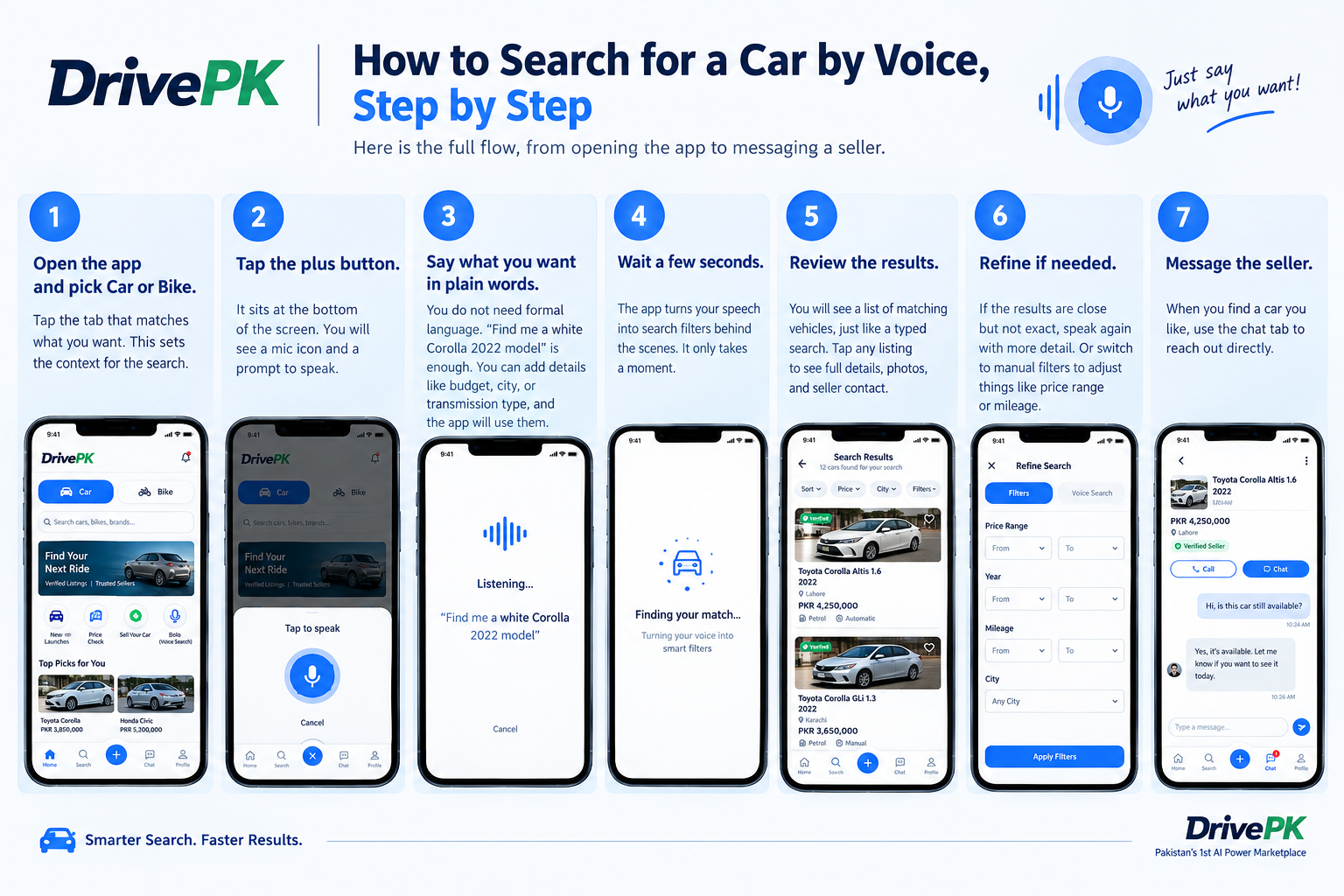
Here is the full flow, from opening the app to messaging a seller.
Step 1: Open the app and pick Car or Bike. Tap the tab that matches what you want. This sets the context for the search.
Step 2: Tap the plus button.It sits at the bottom of the screen. You will see a mic icon and a prompt to speak.
Step 3: Say what you want in plain words.You do not need formal language. "Find me a white Corolla 2022 model" is enough. You can add details like budget, city, or transmission type, and the app will use them.
Step 4: Wait a few seconds. The app turns your speech into search filters behind the scenes. It only takes a moment.
Step 5: Review the results.You will see a list of matching vehicles, just like a typed search. Tap any listing to see full details, photos, and seller contact.
Step 6: Refine if needed. If the results are close but not exact, speak again with more detail. Or switch to manual filters to adjust things like price range or mileage.
Step 7: Message the seller. When you find a car you like, use the chat tab to reach out directly.
That is six or seven quick actions, and most of them are a tap or a sentence.
What to Say: Simple Examples
The source example is a white 2022 Corolla. You can build on that idea. These are my own sample phrases, not official commands, so treat them as a starting point.
You could say, "Find me a white Corolla, 2022 model, in Rawalpindi." Or, "Show me automatic hatchbacks under my budget." Or, "I want a petrol SUV with a sunroof."
The pattern is easy. Start with the make and model. Then add the year, colour, city, budget, or feature. The more clear details you give, the closer the results should be.
If you are not sure about the model, describe the type of car you want. Then use the features section to narrow the list.
Who Gains the Most From Voice Search
Voice search is not only for people who enjoy talking to their phones. A few groups gain more than others.
Older buyers often find long typing and filter menus hard. Speaking a sentence is much easier for them.
Parents can search hands-free. If you are shopping for a family car with a toddler in the back seat, that helps.
People in a hurry gain too. Maybe you are standing in a showroom, walking somewhere, or riding as a passenger. You can search without stopping to type.
It can also help with tricky model names. Saying a name aloud is often easier than typing it correctly on a small keyboard.
Where Voice Search Can Slip
No voice tool works perfectly everywhere. Background noise can confuse it. Strong accents can too. And mixing Urdu and English in one sentence can trip up any voice system, not just this one.
That matters in Pakistan, where many people switch between languages while speaking. If a search does not show what you expected, do not repeat it five times. Switch to manual filters instead. The app keeps that option open, so you are never stuck with only one way to search.
Also remember that voice search finds listings. It does not check the car for you. You still need to inspect the vehicle, verify the paperwork, and confirm the final price with the seller.
Tips for Getting Better Results
Speak in a quiet place when you can. A noisy road makes it harder for any app to hear you.
Keep your sentence short and clear. Say the make, model, and year first.
Add one or two details at a time. If you pack in ten requirements, the results may come back too narrow.
Use price alerts as a backup. If the car you want is not listed today, an alert can tell you when a match goes live.
Finally, use the price checker before you contact a seller. It is DrivePK's AI tool for judging whether a price looks fair, and it gives you a useful reference point before you negotiate.
Final Words
Searching for a car by voice will not fix every problem in the market. Prices will still move, and you will still need to check each car carefully. But it can make the first step faster.
With DrivePK's Bolo APP,s feature, you tap the plus button, say what you want, and review the matches. If the app mishears you, filters are one tap away. For a buyer who is tired of typing and scrolling, that is a small but real gain. For more updates, visit DrivePK.com
Tags
Share this article
About the Author

Najeeb Khan
Automotive enthusiast and writer
Comments (0)
Login Required
You need to be logged in to comment on this article.
No comments yet. Be the first to share your thoughts!
Related Articles

DrivePK Bolo vs Manual Filters: Which Finds Your Car Faster
Is the DrivePK Bolo App really faster than manual filters? We ran three car searches both ways and timed each one. See which method won, where voice search struggled, and why using both together gave the quickest way to find the car in Pakistan. Learn when to switch to filters.

Bolo App: DrivePK Voice Car Search Pakistan
Most car apps force you to type and scroll. DrivePK’s Bolo App lets you speak what you want and finds matching cars. Here is how the voice tool works, what your phone needs, and where it helps Pakistani buyers most.